Everything. In One Place.


THE BLOG

TOPICS


About

Hi! My name is Cam MacMurchy. I was born and raised in Canada and worked as a radio journalist before moving to China in 2004.

I have been in Hong Kong since 2008 and currently work as the head of global media relations and content at a large Hong Kong-listed technology company.  This blog is simply a place for random thoughts. Contact me anytime.


Follow

Stay up to date

Great Journalism from around the internet

Born on television… literally

Throughout my life, I’ve always had a go-to answer to the question: “Tell us something unique about yourself.”

Back in 1979, when I was born, fathers helping out in prenatal care was quite new. So new, in fact, that Canada’s national broadcaster, the CBC, decided to dedicate a three part series to the subject. But to do that, they needed an example — a couple embracing these new methods on the journey towards childbirth.

Enter Murray and Maureen, who graciously gave up their time (and some of their dignity!) to play along. You see where this is going…

By the third installment, it was time to go into labor. The television camera peered through a delivery room window to see the doctor pick me up and wash me off.

This video lived on a beta tape for decades, and was only recently gifted to me by my sister, who had found it while digitizing a huge library of home videos.

Anyway, for posterity, here it is. (And enjoy the 70s fashion!)

A cool use for AI-generated video?

My YouTube algorithm served up a video on the history of the Las Vegas strip earlier today — catnip for somebody who loves history documentaries. So I pressed play while I was puttering around the house getting things done.

It didn’t take long to capture my attention, though, because near the beginning the “host” says the video is made with AI. Indeed, the entire YouTube channel, Thomas Relives History, uses old photographs and other material to create high resolution video and bring the past to life. What an excellent use-case!

The channel sells itself this way:

This channel is about reliving the past through visual reconstruction. Using modern tools to step back into earlier worlds — not to reinterpret history, but to experience it from within. From the street level, the workplace, the quiet moments between major events.

Thomas Relives History goes beyond famous landmarks and well-worn timelines. It focuses on environments, processes, and situations that are rarely shown in detail: how places functioned, how moments felt, and how history was lived before it was ever recorded as history.

The goal is simple — to make the past feel closer, more human, and more tangible.

No spectacle. No shortcuts. Just history, relived.

The channel is still quite new – having launched in January 2026 – with fewer than 7,000 subscribers as I write this. Pop over and see what you think.

I suspect many others might copy this idea, and soon.

Sharing an AI product I’ve found useful

Like many others, I’ve been deep inside AI world for the past several months. The launch of Claude Cowork, in particular, alongside the proliferation of MCP servers has opened up all kinds of potential. I hope to share some of these ideas in the future.

For now, here’s a simple daily news roundup that I find helpful: the AI Daily Brief.

I pay and subscribe to a few dozens newsletters – most on Substack – and subscribe to even more RSS feeds that focus on what’s happening in AI. The problem: I don’t have enough time, every day, to go through all that material in addition to all the work-related stuff I need to read. So I created an agent to compile a summary of the most important items.

To do so, I gave it access to my email and Substack subscriptions, as well as my folder of RSS feeds on Inoreader. So I’ve already curated the sources — AI is taking that and compiling a summary of the most important developments. I don’t want to miss anything, so I also asked the agent to do a general news search. Lastly, I provided it with a selection of tools I use (software like Obsidian, DEVONthink, and Craft) and asked it to share any new AI-related news or workflows that have emerged using these tools.

The result is an email that I get every morning, and a corresponding web page that I’m now sharing with the world here. It will publish at 9am daily Hong Kong time.

As always, I’m open to thoughts and suggestions to make this even better. So drop me a line, and let me know what you think.

Check It Out: Darknet Diaries takes listeners deep into a fascinating world of cyber-crime

First off, happy new year! I haven’t been blogging too much recently, but will attempt to increase the frequency in 2024. I am not calling it a “resolution”, as that word implies commitment. It’s much too heavy a word. It induces mild anxiety! So instead, I’ll simply try to pop up here more often. Does that work?

People are always recommending podcasts to me, as they know I devour them whenever I can. Friends and co-workers often remark that I’m easy to spot in a crowd because I’m always wearing my headphones — whether it’s walking to work, heading for lunch, hiking, on airplanes, you name it. I have my podcast favorites, some I dabble in depending on the episode, and a few others that somehow ended up in my queue but I’ve never listened to. Darknet Diaries was one of those.

Each episode of Darknet Diaries looks at a security-related incident like an online scam, phishing attempt, crypto-crime, or penetration testing, the art of trying to access a building or server without authorization. Companies will often hire hackers and “pen testers” to find weak points in their security, often leading to precarious situations.

Darknet Diaries is hosted by Jack Rhysider, a guy whose previous career in cyber-security enables him to break down issues and make them understandable to the layman (i.e. me). He’s a superb storyteller and comes across as casual and conversational, never talking down to the audience and always making sure they’re following along.

If this sounds good to you, dive in with any episode — I haven’t found a bad or boring one yet. But for an extra treat, I was fascinated by the story of a former criminal named Gollumfun (who is active on X). Those are episodes 128 and 129. As they say, you can find the show wherever you get your podcasts.

Let me know what you think.

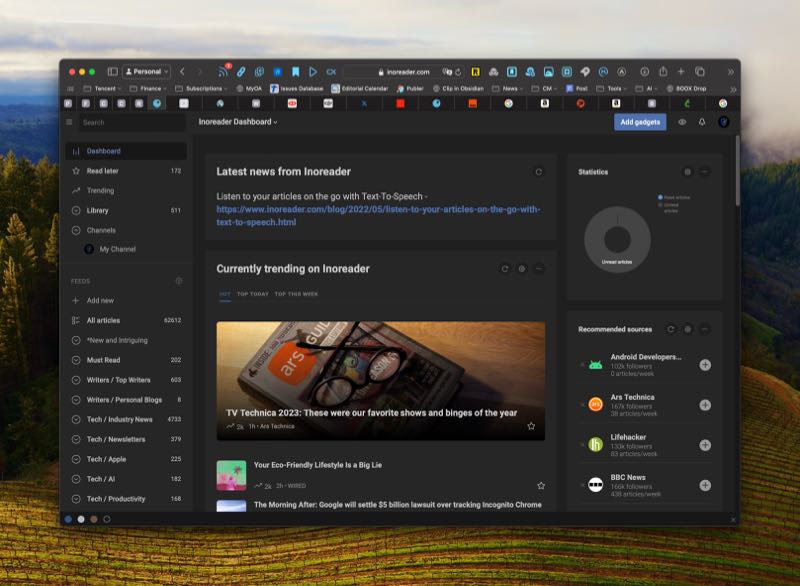
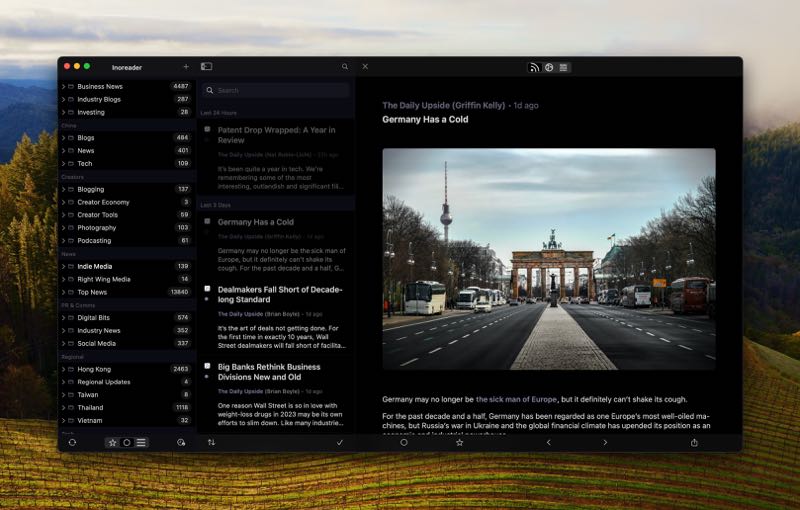
Inoreader and Fiery Feeds is the killer RSS combo news junkies need

One of my nerdier goals during the Christmas break has been cleaning up my messy and discombobulated news ecosystem. I’ve used RSS regularly for a long time, so that’s naturally picked up some cruft in recent years. Throw in a plethora of Substack newsletters and links scattered across various ‘read later’ apps, and you see the potential for some serious link chaos.

The first step was to clean up my feeds in Inoreader, which I’ve mostly done. Inoreader remains the most powerful RSS reader on the market, packed with features for power users. I make good use of the highlighter, rules, tags, and filters. I’ve even combined RSS feeds to create new ones that I can use elsewhere. If you just want to track a few blogs, Inoreader is probably overkill; but if you want to slice and dice through the information overload, Inoreader is among the best ways to do it.

Several years ago I also loved Fiery Feeds, a boutique app available across Apple’s platforms. I remember loving the app, but running into bugs frequently enough that it soured on me over time. And to be honest, I’ve never quite felt right about RSS since then. So after I cleaned up Inoreader, I decided to connect it to the Fiery Feeds app on MacOS, iOS, and iPadOS and give it another shot — and I’m in love.

I had forgotten how clean and streamlined the app is. Fiery Feeds brings over saved searches, tags, and other features of Inoreader, while adding the ability to create “sections”, which can be groups of folders, feeds, or both. I’ve always wanted at least one or two levels down of nested folders, and this feature scratches that itch.

Fiery Feeds also offers granular control over how the app looks and functions, including text font and sizes across various different views, whether you want a one, two, or three-pane view, what left and right swipes will trigger, and which apps to integrate as sharing options. I’ve only started using Fiery Feeds again for the past few days, and so far it’s been totally bug free. Things are efficiently clicking along for me again for the first time in years. It’s lovely!

After I got everything up and running, I decided to dig into some more complex automations. For instance, I connected Zapier and the app Pushcut to deliver urgent notifications to my phone if a news article met a certain set of criteria. I also opened a Telegram Channel and automated a custom news feed directly into the channel, and so far it’s working great. If there’s any interest in how I’ve set this up, let me know below (or ping me on X, Mastodon, Threads, or Bluesky) and I can throw together a tutorial.

Next, sorting through the various ‘read later’ apps I’ve tried over the years, which now includes Goodlinks, Omnivore, Cubox, Anybox, Articles+, UpNext… (hey, for some people, trying every notes app is their thing — don’t judge)


Killer app to simplify Zoom calls on a teleprompter

The pandemic lit a fire under people to improve their home work setups, including how they come across on Zoom calls. I remember in the early days of the pandemic finding a video that explained how to make a simple teleprompter for use during video calls, because they enable constant eye contact with the audience while still looking directly at a monitor so you can see everyone else.

Better Display 2 is a free download from the Mac App Store. The Pro version costs US$17.

If you’re interested, I might do a walkthrough of the whole process. I took that initial idea and tweaked it a bit to make it even better. One of those improvements was getting a thinner, but bigger, display that would be reflected off the teleprompter glass. This created a problem, though: the reflected image appears backwards.

Read more

Podcast recommendation: Heavyweight is a sweet, touching, emotional roller-coaster of a show (in a good way)

I’m one of those people who basically leaves AirPods in their ears 24/7 — but in my case, it’s not usually for music. I’ve become a certifiable podcast addict with a wide-range of shows in my queue — everything from discussions about the Vancouver Canucks to productivity software to Saturday Night Live (definitely check out Fly on the Wall if you’re an SNL fan).

Amid that sea of shows, one really stands out: Heavyweight. If you haven’t listened before, do yourself a favor and head over to Spotify right now (yes, unfortunately it’s a Spotify exclusive) and treat yourself.

My description won’t do the show justice, but I’ll try: each episode involves going deep into somebody’s past to “the moment everything changed.” It could be an issue that still nags at a person many years later, or unfinished business, or some mystery from the person’s past that they want resolved. Ultimately, they want peace of mind.

Heavyweight is hosted by This American Life alum Jonathan Goldstein (a fellow Canadian!), who has evolved into an absolute master storyteller. In fact, Goldstein was interviewed earlier this year on the Longform podcast, where the hosts called Heavyweight the best podcast out there.

The show is seasonal, with new episodes coming this fall. In the meantime, dive into the back catalog as the shows aren’t time sensitive. I’ve also included an interview featuring Goldstein below, but don’t watch it yet. Listen to a few episodes first, and then come back. You’ll get much more out of it.

Enough of me pontificating. Just trust me on this one — go have a listen. Now.

Tuk Tuk’n it in Sweaty Bangkok

I’ve gone down the rabbit hole of cameras and audio equipment over the past year, which has led me to establishing a new personal challenge: documenting trips in a more creative and compelling way. I’m officially an ‘old’, so still post still photos to Instagram and think that’s sufficient. And while I have no designs on becoming a full-time Tik Tok’er, I do want to do a better job of documenting these moments for myself to look back on someday.

That’s a long-winded way of saying I recently impulse-purchased my first 360-degree camera, the Insta360 X3. It’s a nifty little device that won’t win any video quality awards, but it does give the user (me) the peace of mind of knowing that it’s shooting footage everywhere. No need to point a 360 camera at anything, because it’s capturing everything.

After picking up some things at the grocery store, I decided to pull out the camera on a tuk tuk ride back to the condo. It’s not a slick video by any means, but I think it captures the moment.

Let me know what you think.

Contact Me

I would love to hear from you.

Newsletter Signup Latest posts: